Load as motion, not digits
Some people would rather read CPU load as movement in the menu bar than as a number that changes every second.
Animated CPU menu bar pet
CapyBite turns your Mac’s CPU usage into the movements of a playful menu bar companion. See system load at a glance, explore detailed stats, and choose from 26 animated character skins.
Free · Version 1.0.9 · macOS 13 or later
CapyBite is an independent application and is not affiliated with or endorsed by RunCat.

Background
People arrive at this kind of app for a few different reasons.
Some people would rather read CPU load as movement in the menu bar than as a number that changes every second.
Others want a cute menu bar character and detailed system monitoring from the same app, in one popover.
And some simply want to pick a different character and decide which readouts sit next to it in the menu bar.
What it does
Everything CapyBite puts in your macOS menu bar.
The character’s animation speed follows your CPU usage, so a busy Mac is visible without opening anything.
Seven capybara scenes and nineteen moving characters, switchable at any time in settings.
The core four metrics, read on-device roughly once a second.
Network activity, disk read and write, and the thermal state your Mac reports.
Wi-Fi strength, how long your Mac has been running, and the displays attached to it.
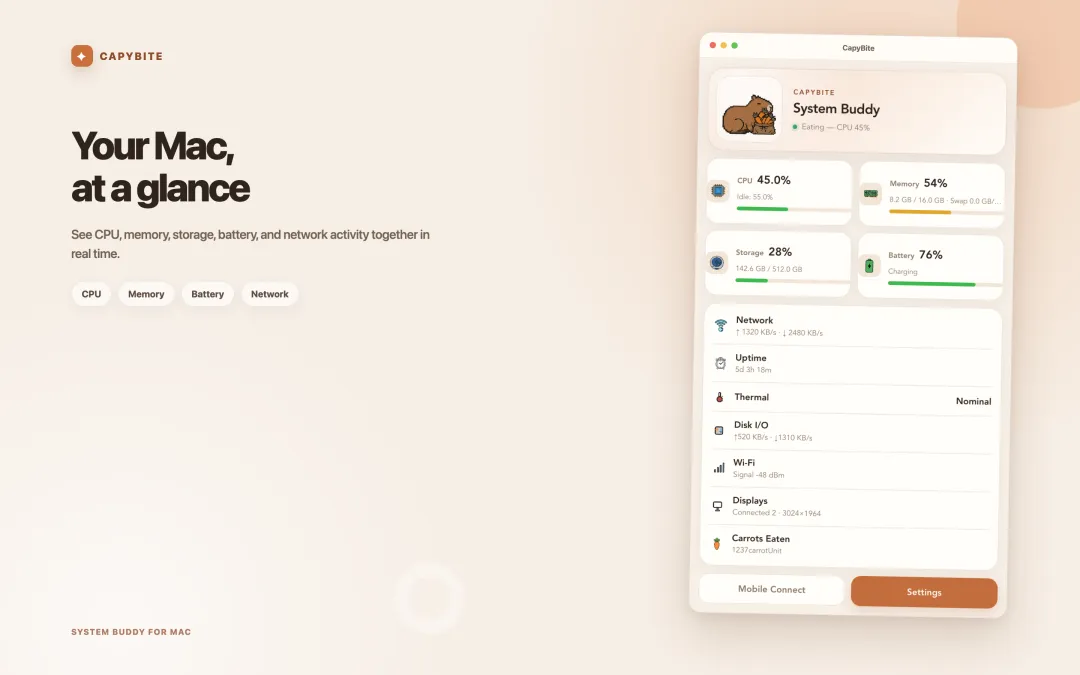
Choose which of the 11 monitoring items appear next to the character.
Pair with CapyBite Mobile on iPhone or Android to check your Mac from another room.
Korean, English, Simplified Chinese, Russian, Spanish, Japanese and French.
How it works
CapyBite sits in the Mac menu bar and can start automatically when you log in.
Below 20% the character rests, from 20–69% it speeds up, and past 70% it moves fastest.
Click the icon and the popover lists every monitoring item you have turned on.
At a glance
Publicly listed details for the current Mac App Store version.
FAQ
CapyBite is an independent application and is not affiliated with or endorsed by RunCat.
Yes. CapyBite reads CPU usage on your Mac about once a second and changes the character’s animation speed in three stages, so a busier CPU means faster movement.
CPU, memory, storage, battery and network, plus disk I/O, thermal state, Wi-Fi signal, uptime and connected displays — 11 monitoring items in total.
Yes. CapyBite includes 26 animated skins — seven capybara scenes and nineteen moving characters — and you can switch between them at any time.
Yes. Pair CapyBite with the CapyBite Mobile app for iPhone or Android to see your Mac’s status remotely.
No. CapyBite is a macOS menu bar app. Only the companion mobile app is available beyond the Mac.
Yes. CapyBite runs on Apple Silicon Macs with macOS 13 or later.
A CPU-responsive character in the menu bar, with 11 system readouts one click away.